

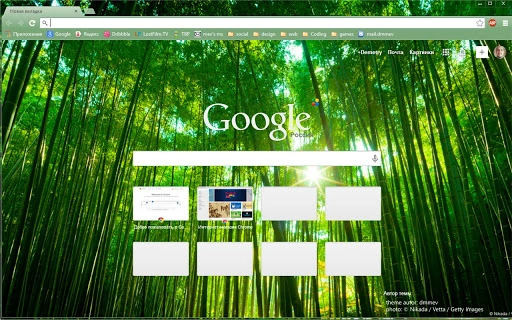
Description
Asian Bamboo Forest Wallpapers
Overview
The software offers a curated collection of Asian bamboo forest-themed wallpapers designed for desktop users seeking a tranquil and visually soothing digital environment. These wallpapers are intended to enhance the aesthetic appeal of personal computers, providing a nature-inspired backdrop that promotes relaxation and focus. The primary purpose is to transform the user’s desktop interface into a serene, immersive space reminiscent of lush bamboo groves in East Asia.
Target users include individuals who value mindfulness, digital wellness, and minimalist design. This includes remote workers, students, creatives, and anyone looking to reduce screen fatigue through natural visuals. The software does not include interactive features or dynamic elements—its function is purely visual, serving as a static wallpaper application.
Real-world usage scenarios include setting a calming background during work sessions, meditation breaks, or study periods. It is suitable for both Windows and Mac operating systems, offering a seamless experience across platforms. The developer did not provide additional details about their background or development philosophy.
Key Features & Capabilities
- High-Resolution Nature Imagery – Features detailed, high-quality images of Asian bamboo forests captured in natural lighting conditions. These visuals are optimized for full-screen display on modern monitors.
- Platform Compatibility – Supports both Windows and Mac operating systems, allowing users to apply the same theme across different devices.
- Easy Application Process – Users can set any image as a desktop background with minimal steps, typically through a simple right-click or drag-and-drop interface.
- Thematic Consistency – All wallpapers maintain a cohesive visual style centered on green hues, natural textures, and balanced composition, promoting a harmonious user experience.
- Non-Interactive Design – The software functions as a static image pack, with no animations, transitions, or embedded scripts.
These features allow users to quickly replace their default desktop backgrounds with nature-inspired visuals. For example, a student preparing for exams might use a bamboo forest wallpaper to create a focused, distraction-free workspace. A remote worker could apply a new wallpaper each week to refresh their digital environment and maintain mental clarity.
User Interface, Workflow & Performance
The user interface is minimal and focused on image presentation. The software likely presents a grid or list view of available wallpapers, enabling users to browse and select their preferred image. Navigation is expected to be intuitive, relying on standard desktop interaction patterns such as clicking or double-clicking to preview and apply an image.
Workflow efficiency is high, as the process of selecting and applying a wallpaper requires only a few actions. No complex setup or configuration is needed. The developer did not specify resource usage details, so performance behavior remains general. Based on typical software patterns, the application is expected to have low CPU and RAM consumption, especially since it operates as a static image viewer with no background processes.
Stability is assumed to be consistent, given the non-interactive nature of the software. No known crashes or errors were reported in the provided information. Performance observations are based on general software behavior patterns.
Compatibility & System Requirements
Support is confirmed for Windows and Mac operating systems. The software is designed to work across both platforms, ensuring broad accessibility for desktop users. However, exact system requirements were not listed, including minimum CPU, RAM, or storage specifications.
Installation size is not specified, but given the nature of the software—pure image content—it is likely to be lightweight. The developer did not provide details on supported screen resolutions or display scaling settings. Compatibility information was partially provided, with platform support clearly stated but technical specifications missing.
Pros and Cons
Pros
- Offers visually calming and high-quality nature imagery
- Simple, fast setup with no complex configuration
- Available for both Windows and Mac users
- Lightweight and non-intrusive in system performance
- Free to download and use
Cons
- No dynamic or animated wallpaper options
- Limited interactivity or customization features
- Exact system requirements not disclosed
- Does not include additional tools or utilities
- Static content may become repetitive over time
FAQ Section
Is this software compatible with Windows and Mac?
Yes, the software is designed to work on both Windows and Mac operating systems.
Is the software free to download and use?
Yes, the software is available at no cost.
Does the software require an internet connection?
Installation may require an internet connection, but once installed, the software functions offline.
Are there any security risks associated with using this software?
The software is a static image pack with no executable code or embedded scripts. It is considered secure when downloaded from official sources.
How often are updates released?
Update frequency was not specified in the provided information.
Final Thoughts + CTA
Asian Bamboo Forest Wallpapers delivers a focused, serene experience for users seeking a peaceful digital environment. Its strength lies in simplicity and visual quality, offering a distraction-free, nature-inspired backdrop without unnecessary complexity. While it lacks advanced features like animations or customization tools, its core purpose—enhancing the desktop with calming imagery—is fulfilled effectively.
This software is ideal for individuals who prioritize mental well-being, visual aesthetics, and minimalism in their digital workspace. Remote workers, students, and creative professionals will benefit most from its ability to reduce screen fatigue and foster a mindful computing experience.
With no cost and broad platform support, it represents a low-risk, high-reward addition to any desktop setup. Download Asian Bamboo Forest Wallpapers now.
Guides & Tutorials for Bamboo Forest Theme for Chrome
How to install Bamboo Forest Theme for Chrome
- Click the Preview / Download button above.
- Once redirected, accept the terms and click Install.
- Wait for the Bamboo Forest Theme for Chrome download to finish on your device.
How to use Bamboo Forest Theme for Chrome
This software is primarily used for its core features described above. Open the app after installation to explore its capabilities.
User Reviews for Bamboo Forest Theme for Chrome 0
No reviews found





